
AST
什么是 AST
我们日常中用到的 babel、eslint 等插件,其实背后原理就涉及到 AST,即抽象语法树(Abstract Syntax Tree,AST),它是源代码语法结构的一种抽象表示。
我们直接看 AST Explorer 的默认栗子:
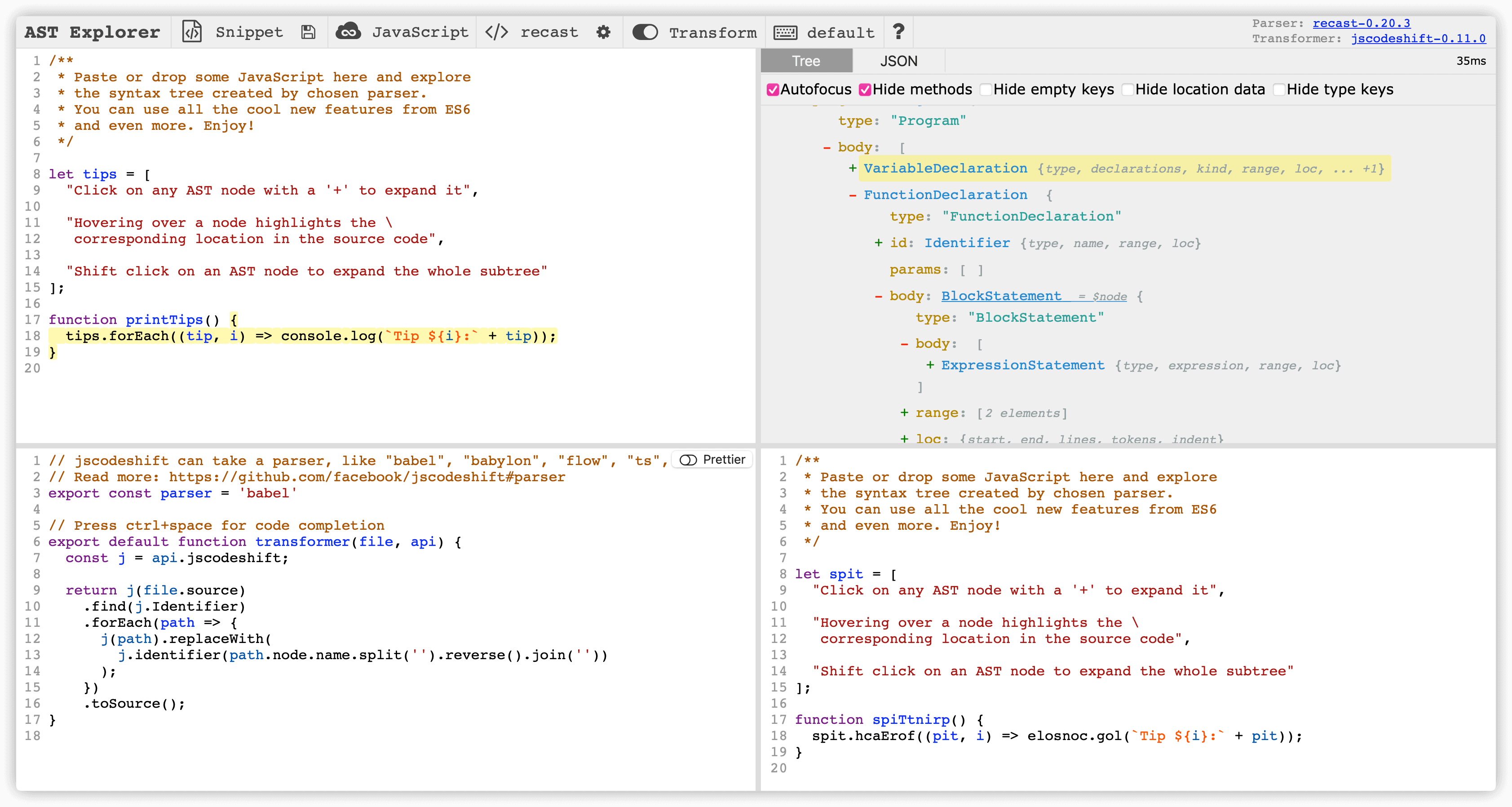
从图片右上角可以看出 AST 就是一个自上而下的树形结构,每一层有一个或多个节点组成,每个节点由一个 type 属性表示节点的类型如 FunctionDeclaration, BlockStatement, VariableDeclaration,以及其他属性组成,从而形成一种树级结构。
如何手写一个编译器
整节内容可以参考这里 the-super-tiny-compiler 👈
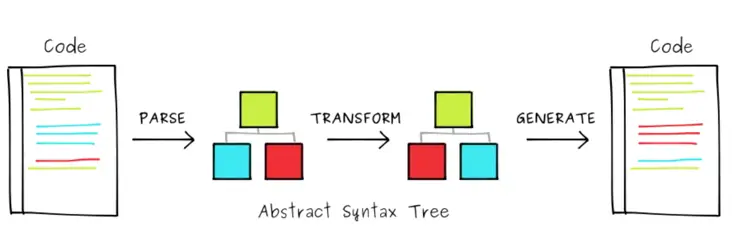
大多数编译器可以分成三个阶段:
- 解析(Parse) - 即将源码转换为 AST
- 转换(Transform) - 接收 AST 并对其进行遍历,在此过程中对节点进行添加、更新及移除等操作
- 生成(Generate) - 根据最终 AST 来输出代码
词法分析 / 语法分析
解析一般来说会分成两个阶段:
- 词法分析(Lexical Analysis) - 将代码转换为一个语法片段数组 Tokens。Tokens 是一个由代码语句碎片组成的数组,内部可以是数字、标签、标点符号、运算符,或者其它任何东西
- 语法分析(Syntactic Analysis) - 把 Tokens 转换成 AST 形式
// 示例源码
(add 2 (subtract 4 2))

// 可能的 Tokens
[
  { type: 'paren',  value: '('        },
  { type: 'name',   value: 'add'      },
  { type: 'number', value: '2'        },
  { type: 'paren',  value: '('        },
  { type: 'name',   value: 'subtract' },
  { type: 'number', value: '4'        },
  { type: 'number', value: '2'        },
  { type: 'paren',  value: ')'        },
  { type: 'paren',  value: ')'        }
]

// 可能的 AST
// Program 代表的是根节点
{
  type: 'Program',
  body: [{
    type: 'CallExpression',
    name: 'add',
    params: [{
      type: 'NumberLiteral',
      value: '2'
    }, {
      type: 'CallExpression',
      name: 'subtract',
      params: [{
        type: 'NumberLiteral',
        value: '4'
      }, {
        type: 'NumberLiteral',
        value: '2'
      }]
    }]
  }]
}
如何手写一个 eslint 插件
有了 AST 就可以对它进行从上到下的递归遍历,过程中使用一种名为访问者模式的设计模式访问树里的节点。这种模式通过创建一个包含一些方法的对象 visitor,在遍历 AST 过程中匹配 visitor 里的方法名,匹配成功就调用此方法。通过访问 AST 节点可以对源码进行语法检查,ESLint 就是基于此工作的。
限制函数参数数量
export default function (context) {
  return {
    // 访问 FunctionDeclaration 节点
    FunctionDeclaration: (node) => {
      // 判断函数参数个数
      if (node.params.length > 3) {
        context.report({
          node,
          message: "参数最多不能超过3个"
        });
      }
    }
  }
}
稍微修饰下:
//------------------------------------------------------------------------------
// Rule Definition https://eslint.org/docs/developer-guide/working-with-rules
// createRule 是引用了 @typescript-eslint/experimental-utils 里的 ESLintUtils.RuleCreator 方法
//------------------------------------------------------------------------------
import createRule from '../misc/createRule'

interface IOptions {
  maxLen: number
}

type TMessageIds = 'tooLong'

const rule = createRule<[IOptions], TMessageIds>({
  name: 'parametersmaxlength',
  meta: {
    type: 'suggestion',
    docs: {
      description: 'parameters max length',
      recommended: 'error',
    },
    messages: {
      tooLong: '不要超过  个参数哦',
    },
    schema: [
      {
        type: 'object',
        properties: {
          maxLen: {
            type: 'number',
            default: 3,
          },
        },
        additionalProperties: false,
      },
    ],
  },
  defaultOptions: [
    {
      maxLen: 3,
    },
  ],
  create(context, [options]) {
    const { maxLen } = options
    /**
    * 获取函数的参数的开始、结束位置
    * @param {node} node AST Node
    */
    function getFunctionParamsLoc(node) {
      const paramsLength = node.params.length
      return {
        start: node.params[0].loc.start,
        end: node.params[paramsLength - 1].loc.end,
      }
    }
    return {
      FunctionDeclaration: (node) => {
        if (node.params.length > maxLen) {
          context.report({
            // loc is an object specifying the location of the problem.
            // If both loc and node are specified, then the location is used from loc instead of node.
            loc: getFunctionParamsLoc(node),
            node,
            data: {
              maxLen,
            },
            messageId: 'tooLong',
          })
        }
      },
    }
  },
})

export default rule
限制嵌套的条件语句
匹配类型为 IfStatement 的节点,如果它的第一个子节点还是 IfStatement 就进行提示:
export default function (context) {
  return {
    IfStatement(node) {
      const { consequent: { body = [] } } = node

      // 判断第一个子节点类型是否是 IfStatement
      if (body[0] && body[0].type === 'IfStatement') {
        context.report({
          node: body[0],
          message: '不允许嵌套的条件语句'
        })
      }
    }
  }
}
当然我们也可以实现中英文之间保留空格的规范等等,这里就不展开介绍了。
如何手写一个 babel 插件
Babel 就是一个通用的多功能的 JavaScript 编译器。其工作原理就是修改代码 AST 上的节点,从而到达修改代码的目的。一个 Babel 插件是一个接收 babel 对象作为参数的函数,返回一个带有 visitor 属性的对象。visitor 对象中的每个函数接受 path 和 state 参数。详情可以查阅 babel-handbook 👈
将 ** 语法转换为 Math.pow
// Before
const a = 10 ** 2
// After
const a = Math.pow(10, 2)
- 找到 ** 语法所在位置
- 获取左右操作数
- 创建 Math.pow 语句,替换原节点
export default function (babel) {
  const { types: t } = babel

  return {
    visitor: {
      // 访问二元表达式
      BinaryExpression(path) {
        const { node } = path
        // 如果操作符不是 ** 就退出
        if (node.operator !== '**') return
        const { left, right } = node
        // 创建调用语句
        const newNode = t.callExpression(
          t.memberExpression(t.identifier('Math'), t.identifier('pow')),
          [left, right]
        )
        // 替换原节点
        path.replaceWith(newNode)
      },
    }
  }
}
修改工具函数引入方式
// Before
import { get, isFunction } from 'lodash'
// After
import get from "lodash/get"
import isFunction from "lodash/isFunction"
- 找到 lodash 的 import 节点
- 遍历所有的引入值,获取引用的 name 属性
- 插入新生成的 import 节点
- 删除原节点
export default function (babel) {
  const { types: t } = babel

  return {
    visitor: {
      // 访问导入声明
      ImportDeclaration(path) {
        let { node } = path
        if (node.source.value !== 'lodash') return
        const val = node.source.value

        node.specifiers.forEach((spec) => {
          if (t.isImportSpecifier(spec)) {
            const { local } = spec

            // 插入新的导入节点
            path.insertBefore(
              t.importDeclaration(
                [t.importDefaultSpecifier(local)],
                t.stringLiteral(`${val}/${local.name}`)
              )
            )
          }
        })
        // 删除原节点
        path.remove()
      },
    }
  }
}
AST 工具库介绍
jscodeshift
jscodeshift 是一个 Facebook 开源的基于 recast 封装的用来对 JavaScript 或者 TypeScript 文件运行转换的工具,它的目的是更方便的批量修改代码。它通过 transformer 对源码进行转换,一个 transformer 就是一个接受 fileInfo, api, options 参数并返回源码的函数。
MUI 批量修改代码的脚本就是基于 jscode 来实现的,即 codemod,举个例子:
// boxRenameGap
import renameProps from './misc/renameProps'

/**
 * @param {import('jscodeshift').FileInfo} file
 * @param {import('jscodeshift').API} api
 */
export default function transformer(file, api, options) {
  const j = api.jscodeshift
  const root = j(file.source)

  const { printOptions } = options

  return renameProps({
    root,
    componentName: 'Box',
    props: { gridGap: 'gap', gridColumnGap: 'columnGap', gridRowGap: 'rowGap' },
  }).toSource(printOptions)
}
具体代码可以参考 github mui-codemod 这里 👈
GoGoCode
GoGoCode 号称全网最简单,易上手,可读性最强,提供类似于 jQuery 的 API 和一套和正则表达式接近的语法用来匹配和替换代码。不过确实上手难度比 jscodeshift 低很多,比如我们可以通过它进行 vue2 到 vue3 的迁移。直接看个官方例子:
// before
const a = 1;
const b = 2;

// after
const a = 1;
const b = 1;
const $ = require('gogocode');
const script = $(source);
// 按照你的意图,用 $_$ 当通配符能匹配任意位置的 AST 节点
const aAssignment = script.find('const a = $_$');
// 获得我们匹配的 AST 节点的 value
const aValue = aAssignment.match?.[0]?.[0]?.value;
// 就像替换字符串一样去替换代码
// 但可以忽略空格、缩进或者换行的影响
script.replace('const b = $_$', `const b = ${aValue}`);
// 把 ast 节点输出成字符串
const outCode = script.generate();
更多关于 AST 工具可以参考 awesome ast 👈
参考链接
- Babel 插件手册
- 学习抽象语法树 AST By 西山居彭于晏