
Express 中间件与路由
什么是 Express
Express 是一个基于 Node.js 平台的极简、灵活的 web 应用开发框架,它提供一系列强大的特性,帮助你创建各种 Web 和移动设备应用。Express 框架建立在 node.js 内置的 http 模块上。http 模块生成服务器的原始代码如下:
var http = require('http')

var app = http.createServer(function (request, response) {
  response.writeHead(200, {'Content-Type': 'text/plain'})
  response.end('Hello world!')
});

app.listen(8000, 'localhost')
Express 框架的核心是对 http 模块的再包装,实际上加了一个中间层。上面的代码用 Express 改写如下:
var express = require('express')
var app = express()

app.get('/', function (req, res) {
  res.send('Hello world!')
});

app.listen(3000)
我们可以快速去生成一个 express 项目:
# 安装
npm install -g express-generator@4
# 创建项目
express express-demo && cd express-demo
express()
express() 用来创建一个 Express 的程序。express() 是一个由 express 模块导出的入口(top-level)函数。
var express = require('expres')
var app = express()
express.static(root, [options]) 是 Express 内置的唯一一个中间件,负责托管 Express 应用内的静态资源,假设在 public 目录下放置图片、样式等:
app.use(express.static(path.join(__dirname, 'public')))
所有文件的路径都是相对于存放目录的,因此存放静态文件的目录名不会出现在 URL 中,访问方式如下:
http://localhost:8000/img/darling.webp
http://localhost:8000/css/style.css

<!-- 文件结构 -->
- public
  - img
    - darling.webp
  - css
    - style.css
Application
| app 属性或方法 | 描述 |
|---|---|
| app.locals | 可以设置程序本地的变量 |
| app.all() | 所有请求都必须通过该中间件 |
| app.METHOD() | 包括 app.get()、app.post(),代表 HTTP 动词方法 |
| app.set() | 用于指定变量的值 |
| app.disable() | 将变量设为布尔值 false,反之为 app.enable() |
| app.listen() | 开启 HTTP 服务器监听连接 |
| app.use() | 挂载中间件方法到路径上 |
app.locals
app.locals 就是程序本地的变量,各属性值将贯穿程序的整个生命周期,与其相反的是 res.locals,它只在这次请求的生命周期中有效。
const pkg = require('./package')
// 设置模板全局常量,可直接访问 blog 变量
app.locals.blog = {
  title: pkg.name,
  description: pkg.description
}
app.all() / app.METHOD()
app.all() 所有请求都必须通过该中间件,参数中的 “*” 表示对所有路径有效,METHOD 是 HTTP 动词方法,包括 app.get()、app.post() 等,这些方法的第一个参数,都是请求的路径。除了绝对匹配以外,Express 还允许模式匹配:
app.all('*', function (req, res, next) {
  res.writeHead(200, { 'Content-Type': 'text/plain' });
  next();
});

// 由于 get 方法的回调函数没有调用 next 方法,所以只要有一个中间件被调用了,后面的中间件就不会再被调用了
app.get('/', function (req, res) {
  res.end('Tate & Snow');
});

app.get('/hello/:name', function (req, res) {
  res.end('Hello, ' + req.params.name + '.');
});
app.set()
app.set() 用于指定变量的值,但如果参数是程序设置之一,它将影响到程序的行为:
// 设置模板目录
app.set('views', path.join(__dirname, 'views'))
// 设置模板引擎为 ejs
app.set('view engine', 'ejs')
app.disable() / app.enable()
app.disable() 用于指定变量为布尔值 false,可通过 app.disabled() 方法进行判断,反之对应 app.enable() 和 app.enabled():
app.disable('foo')
// 等价于
app.set('foo', false)

app.get('foo') // false
app.disabled('foo') // true
app.listen()
app.listen(port, [hostname], [backlog], [callback]) 开启 HTTP 服务器监听连接:
// 监听端口,启动程序
app.listen(config.port, function () {
  console.log(`${pkg.name} listening on port ${config.port}`)
})
app.use()
app.use() 挂载中间件方法到路径上。如果路径未指定,那么默认为 “/”,具体用法查看下面中间件。
Request
| req 属性或方法 | 描述 |
|---|---|
| req.baseUrl | 一个路由实例挂载的 Url 路径 |
| req.path | 包含请求 URL 的部分路径 |
| req.protocol | 请求的协议 |
| req.hostname | 获取主机名 |
| req.ip | 获取主机 ip 地址 |
| req.route | 获取当前匹配的路由 |
| req.is | 判断请求头 Content-Type 的 MIME 类型 |
| req.params | 一个对象,其包含了一系列的属性,这些属性和在路由中命名的参数名是一一对应的 |
| req.query | 一个对象,为每一个路由中的 query string 参数都分配一个属性 |
| req.body | body-parser 等解析请求体的中间件后,会返回以 key-value 的数据 |
| req.cookies | cookie-parser/multer 解析后,会返回请求头中包含的 cookies,默认为 {},访问签名的 cookie 为 req.signedCookies |
req.baseUrl / req.path
router.get('/jp', function (req, res) {
  console.log(req.baseUrl); // greet
  res.send('Konichiwa!');
});
app.use('/greet', router);
// example.com/users?sort=desc
req.path
// => "/users"
req.params
req.params 是一个对象,其包含了一系列的属性,这些属性和在路由中命名的参数名是一一对应的:
router.get('/:postId', function (req, res, next) {
  const postId = req.params.postId // 获取路由 /:postId 的参数 postId
})
req.query
req.query 是一个对象,为每一个路由中的 query string 参数都分配一个属性:
// GET /search?q=tobi+ferret
req.query.q // => "tobi ferret"

// GET /shoes?order=desc&shoe[color]=blue&shoe[type]=converse
req.query.order // => "desc"
req.query.shoe.color // => "blue"
req.query.shoe.type // => "converse"
req.body
// body-parser 等解析请求体的中间件后,req.body 会返回以 key-value 的数据
var bodyParser = require('body-parser');

app.use(bodyParser.json()); // for parsing application/json
app.use(bodyParser.urlencoded({ extended: true })); // for parsing application/x-www-form-urlencoded

app.post('/', function (req, res) {
  console.log(req.body);
  res.json(req.body);
})
req.cookies / req.signedCookies
// cookie-parser/multer 解析后,会返回请求头中包含的 cookies,默认为 {}
// Cookie: name=tate
req.cookies.name // 'tate'

// Cookie: user=tate.CP7AWaXDfAKIRfH49dQzKJx7sKzzSoPq7/AcBBRVwlI3
req.signedCookies.user // 'tate'
req.ip
获取主机 ip 地址,有些情况带有前缀”::ffff:”,可使用正则 req.ip.match(/\d+\.\d+\.\d+\.\d+/)[0]进行处理:
// node 获取 ip
var ip =
  req.headers['true-client-ip'] ||
  req.headers['x-forwarded-for'] ||
  req.connection.remoteAddress ||
  req.socket.remoteAddress ||
  (req.connection.socket ? req.connection.socket.remoteAddress : null); // => "127.0.0.1"
Response
| res 属性或方法 | 描述 |
|---|---|
| res.headersSent | 布尔类型的属性,指示这个响应是否已经发送 HTTP 头部 |
| res.locals | 一个对象,其包含了本次请求的响应中的变量,它的变量只提供给本次请求响应的周期内视图渲染里使用(如果有视图的话) |
| res.cookie() | 设置 cookie,反之为清除 cookie res.clearCookie() |
| res.send() | 发送 HTTP 响应 |
| res.json() | 发送一个 JSON 响应,如 res.json({user:'tobi'}),res.jsonp 可发送 JSONP 响应,效果同 send() |
| res.end() | 结束本响应的过程 |
| res.redirect() | 重定向来源于指定 path 的 URL |
| res.render() | 渲染一个视图,然后将渲染得到的 HTML 文档发送给客户端 |
| res.status() | 设置响应对象的 HTTP status |
| res.type() | 设置 Content-Type 的 MIME 类型 |
| res.set() | 设置 HTTP header,res.header() 的别名 |
res.locals
res.locals 类似于 app.locals,其包含了本次请求的响应中的变量,它的变量只提供给本次请求响应的周期内视图渲染里使用(如果有视图的话):
// 添加模板必需的三个变量
app.use(function (req, res, next) {
  res.locals.user = req.session.user
  res.locals.success = req.flash('success').toString()
  res.locals.error = req.flash('error').toString()
  next()
})
res.cookie()
通过 set-cookie 字段进行设置 cookie,反之为清除 res.clearCookie()。
| Property | Type | Description |
|---|---|---|
| domain | String | Domain name for the cookie. Defaults to the domain name of the app. |
| expires | Date | Expiry date of the cookie in GMT. If not specified or set to 0, creates a session cookie. |
| httpOnly | Boolean | Flags the cookie to be accessible only by the web server. |
| maxAge | String | Convenient option for setting the expiry time relative to the current time in milliseconds. |
| path | String | Path for the cookie. Defaults to “/”. |
| secure | Boolean | Marks the cookie to be used with HTTPS only. |
| signed | Boolean | Indicates if the cookie should be signed. |
res.cookie('name', 'tate', { domain: '.example.com', path: '/admin', secure: true });

// 当使用 cookie-parser 中间件时,也可以支持 signed。res.cookie() will use the secret passed to cookieParser(secret) to sign the value
res.cookie('name', 'tate', { signed: true });
res.send() / res.redirect()
res.send('Hello World')
res.json({name: 'tate'}) // 同 send(),转化为 json

res.redirect(`/posts/${post._id}`)
// back 将重定向请求到 referer,当没有 referer 的时候,默认为 /
res.redirect('back')
res.render()
res.render( 渲染一个视图,然后将渲染得到的 HTML 文档发送给客户端:
// GET /posts/:postId 单独一篇的文章页
router.get('/:postId', function (req, res, next) {
  const postId = req.params.postId
  // 渲染 HTML 路径为 /views/post.ejs,带进去的变量为 post
  res.render('post', { post: postId })
})
res.status()
res.status() 设置响应对象的 HTTP status:
// 404 page
app.use(function (req, res) {
  if (!res.headersSent) {
    res.status(404).render('404')
  }
})
res.set()
res.set() 是 res.header() 的别名,用来设置请求头信息:
res.set('Content-Type', 'text/plain');
res.set('Cache-Control', 'no-cache, max-age=0, no-store, must-revalidate')
中间件
中间件(Middleware) 是一个函数,它可以访问 请求对象(req), 响应对象(res) 和 web 应用中处于请求/响应循环流程中的中间件,下一个中间件函数通常由名为 next 的变量来表示。如果当前中间件没有终结请求/响应循环,则必须调用 next() 方法将控制权交给下一个中间件,否则请求就会挂起。中间件装入顺序很重要:首先装入的中间件函数也首先被执行。
// 基本的中间件结构
function myFunMiddleware(req, res, next) {
  // 对 req 和 res 作出相应操作
  // 操作完毕后返回 next() 即可转入下個中间件
  next();
}
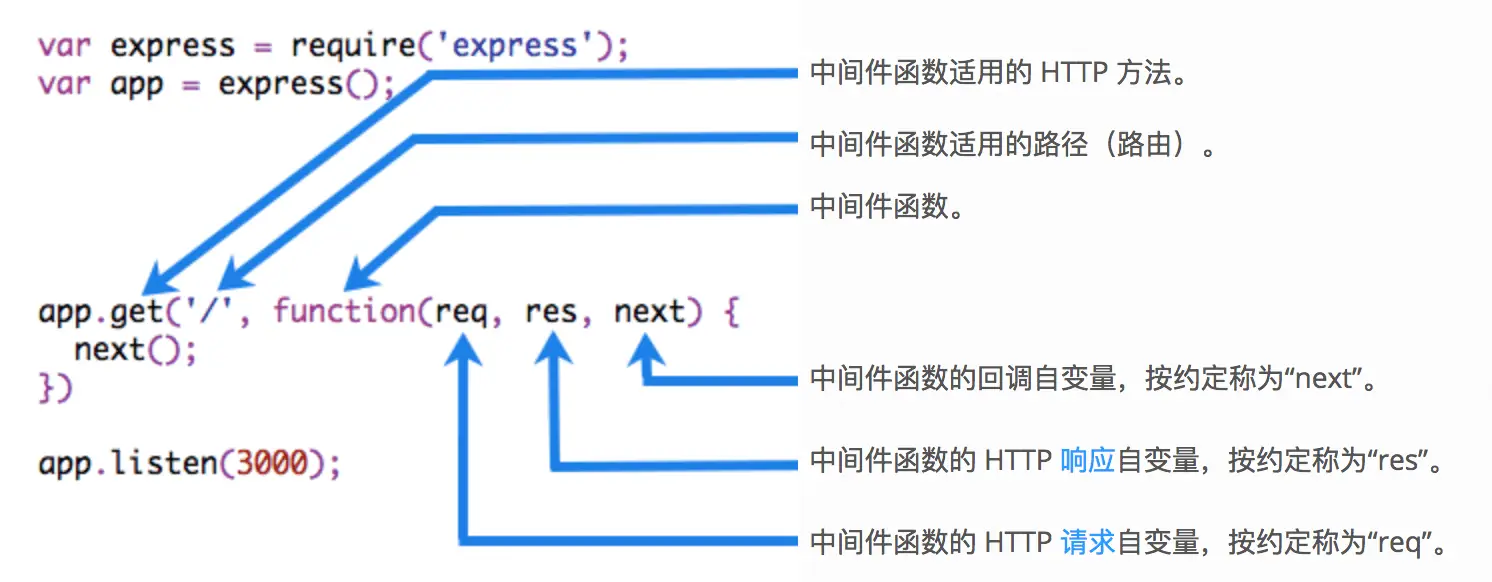
next() 函数不是 Node.js 或 Express API 的一部分,而是传递给中间件函数的第三自变量。next() 函数可以命名为任何名称,但是按约定,始终命名为 “next”。
Express 应用可使用如下几种中间件:
- 应用级中间件
- 路由级中间件
- 错误处理中间件
- 内置中间件
- 第三方中间件
1、应用级中间件绑定到 app 对象,使用 app.use() 和 app.METHOD():
// 没有挂载路径的中间件,应用的每个请求都会执行该中间件
app.use(function (req, res, next) {
  console.log('Time:', Date.now());
  next();
});

// 挂载至 /user/:id 的中间件,任何指向 /user/:id 的请求都会执行它
app.use('/user/:id', function (req, res, next) {
  console.log('Request Type:', req.method);
  next();
});

// 路由和句柄函数(中间件系统),处理指向 /user/:id 的 GET 请求
app.get('/user/:id', function (req, res, next) {
  res.send('USER');
});
2、路由级中间件和应用级中间件一样,只是它绑定的对象为 express.Router(),具体示例查看下面路由
3、错误处理中间件其他中间件定义类似,只是要使用 4 个参数,而不是 3 个,其签名如下: (err, req, res, next),一般在其他 app.use() 和路由调用后,最后定义错误处理中间件:
app.use(function (err, req, res, next) {
  console.error(err.stack);
  res.status(500).send('Something broke!');
});
4、内置中间件,即上述的 express.static
5、第三方中间件,如 cookie-parser、connect-flash 等
const flash = require('connect-flash') // 页面通知的中间件,基于 session 实现
app.use(flash()) // flash 中间件,用来显示通知
路由
每个 Express 程序有一个内建的 app 路由。 路由自身表现为一个中间件,所以你可以使用它作为 app.use() 等方法的一个参数或者作为另一个路由的 use() 的参数。 顶层的 express 对象有一个 Router() 方法来创建一个新的 router 对象。
var router = express.Router([options]);
options 参数可选:
- caseSensitive - 是否区分大小写,默认不启用。对待 /Foo 和 /foo 一样
- mergeParams - 保存父路由的 res.params 。如果父路由参数和子路由参数冲突,子路由参数优先。默认 false
- strict - 启用严格路由。默认不启用,/foo 和 /foo/ 被路由一样对待处理
路由最初的写法:
var http = require('http');
http.createServer(function (req, res) {
  // Homepage
  if(req.url == '/') {
    res.writeHead(200, { 'Content-Type': 'text/html' });
    res.end('Welcome to the homepage!');
  }
  // About page
  else if (req.url == '/about') {
    res.writeHead(200, { 'Content-Type': 'text/html' });
    res.end('Welcome to the about page!');
  }
  // 404!
  else {
    res.writeHead(404, { 'Content-Type': 'text/plain' });
    res.end('404 not found');
  }
}).listen(8000, 'localhost');
Express 里路由的三种写法如下:
1、使用字符串的路由路径示例:
// 匹配 /about 路径的请求
app.get('/about', function (req, res) {
  res.send('about');
});
2、使用字符串模式的路由路径示例:
// 匹配 acd 和 abcd
app.get('/ab?cd', function (req, res) {
  res.send('ab?cd');
});
3、使用正则表达式的路由路径示例:
// 匹配任何路径中含有 a 的路径
app.get(/a/, function (req, res) {
  res.send('/a/');
});

// 匹配 butterfly、dragonfly,不匹配 butterflyman、dragonfly man等
app.get(/.*fly$/, function (req, res) {
  res.send('/.*fly$/');
});
路由句柄有多种形式,可以是一个函数、一个函数数组,或者是两者混合:
var cb0 = function (req, res, next) {
  console.log('CB0');
  next();
}

var cb1 = function (req, res, next) {
  console.log('CB1');
  next();
}

app.get('/example/d', [cb0, cb1], function (req, res, next) {
  console.log('response will be sent by the next function ...');
  next(); // 跳到下一个路由句柄
}, function (req, res) {
  res.send('Hello from D!');
});
可使用 app.route() 创建路由路径的链式路由句柄。由于路径在一个地方指定,这样做有助于创建模块化的路由,而且减少了代码冗余和拼写错误:
app.route('/book')
  .get(function (req, res) {
    res.send('Get a random book');
  })
  .post(function (req, res) {
    res.send('Add a book');
  })
  .put(function (req, res) {
    res.send('Update the book');
  });
可使用 express.Router 类创建模块化、可挂载的路由句柄。Router 实例是一个完整的中间件和路由系统,因此常称其为一个 “mini-app”。下面的实例程序创建了一个路由模块,并加载了一个中间件,定义了一些路由,并且将它们挂载至应用的路径上:
// birds.js
var express = require('express');
var router = express.Router();

// 该路由使用的中间件
router.use(function timeLog(req, res, next) {
  console.log('Time: ', Date.now());
  next();
});
// 定义网站主页的路由
router.get('/', function (req, res) {
  res.send('Birds home page');
});
// 定义 about 页面的路由
router.get('/about', function (req, res) {
  res.send('About birds');
});

module.exports = router;
然后在应用中加载路由模块,应用即可处理发自 /birds 和 /birds/about 的请求,并且调用为该路由指定的 timeLog 中间件:
var birds = require('./birds');
...
app.use('/birds', birds);