
DOM 节点操作
什么是 DOM
DOM(Document Object Model) 的基本思想是把结构化文档(如 HTML 和 XML)解析成一系列的节点,再由这些节点组成一个树状结构(DOM Tree)。所有的节点和最终的树状结构,都有规范的对外接口,以达到使用编程语言操作文档的目的(比如增删内容)。所以,DOM 可以理解成文档的 API。而 JavaScript 是最常用于 DOM 操作的语言。
node 节点
node 类型
DOM 的最小组成单位叫做节点(node),一个文档的树形结构,就是由各种不同类型的节点组成。主要有以下几种类型,它们都继承了 Node 对象的属性和方法:
| 节点 | 类型 | nodeName | nodeType | 含义 | |
|---|---|---|---|---|---|
| Document | Node.DOCUMENT_NODE | #document | 9 | 文档节点 | 整个文档(window.document) |
| Element | ELEMENT_NODE | 大写的 HTML 元素名 | 1 | 元素节点 | HTML元素(比如<body>、等) |
| Attribute | ATTRIBUTE_NODE | 等同于 Attr.name | 2 | 属性节点 | HTML元素的属性(比如 class=”right”) |
| Text | TEXT_NODE | #text | 3 | 文本节点 | HTML 文档中出现的文本 |
| DocumentType | DOCUMENT_TYPE_NODE | 等同于 DocumentType.name | 10 | 文档类型节点 | 文档的类型(比如<!DOCTYPE html>) |
| DocumentFragment | DOCUMENT_FRAGMENT_NODE | #document-fragment | 11 | 文档碎片节点 | 文档的片段 |
document.nodeName // "#document"
document.nodeType // 9

document.querySelector('a').nodeType === 1 // true
document.querySelector('a').nodeType === Node.ELEMENT_NODE // true
node 关系
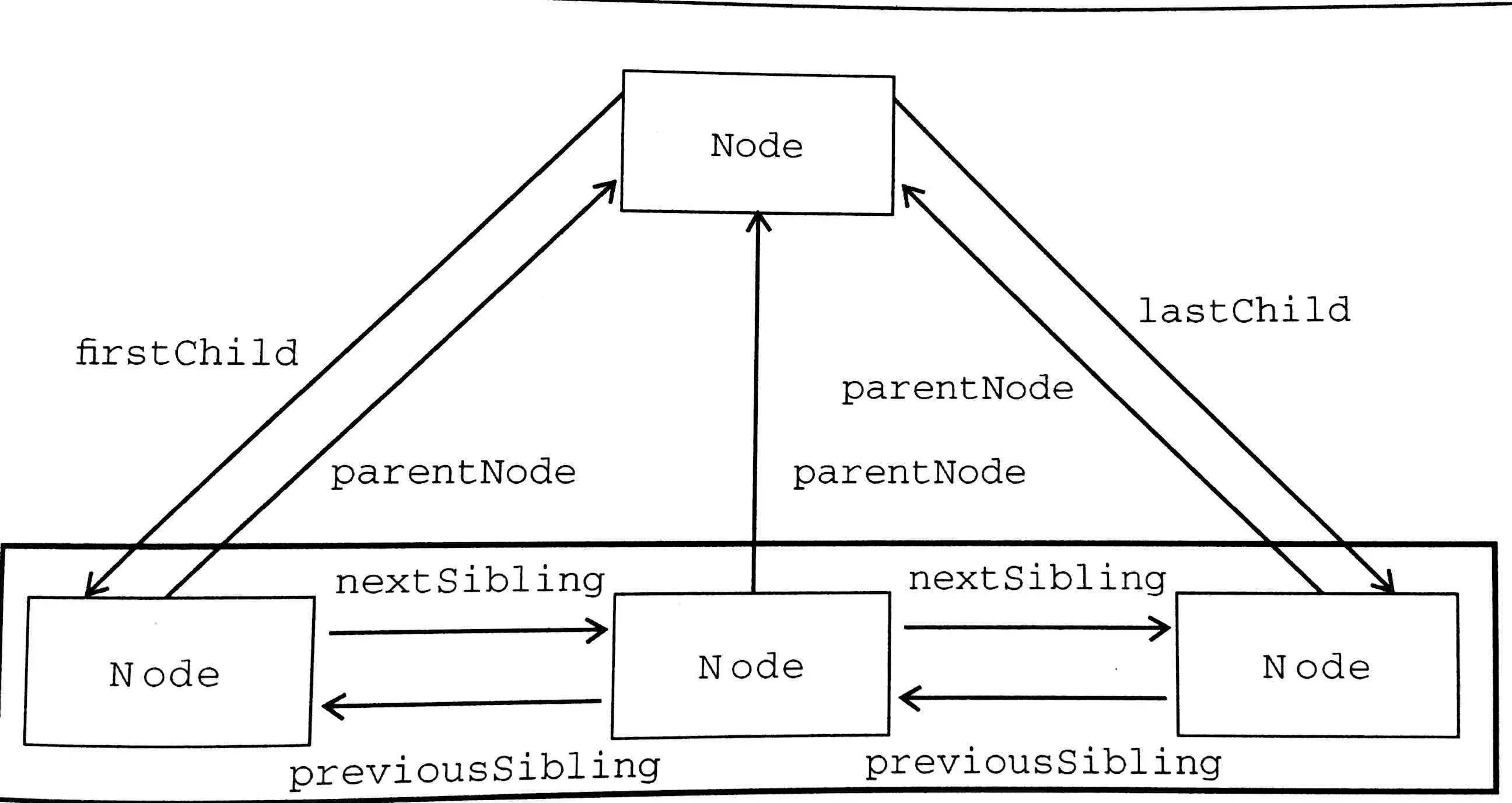
node 操作
- appenChild() - 接受一个节点对象作为参数,将其作为最后一个子节点,插入当前节点
- removeChild() - 接受一个子节点作为参数,用于从当前节点移除该节点
- replaceChild(new, old) - 将一个新的节点,替换当前节点的某一个子节点。它接受两个参数,第一个参数是用来替换的新节点,第二个参数将要被替换走的子节点
- hasChildNodes() - 返回一个布尔值,表示当前节点是否有子节点
- cloneNode() - 克隆一个节点。它接受一个布尔值作为参数,表示是否同时克隆子节点,默认是 false,即不克隆子节点
- insertBefore(new, old) - 将某个节点插入当前节点的指定位置。它接受两个参数,第一个参数是所要插入的节点,第二个参数是当前节点的一个子节点,新的节点将插在这个节点的前面
- contains() - 接受一个节点作为参数,返回一个布尔值,表示参数节点是否为当前节点的后代节点
- isEqualNode() - 返回一个布尔值,用于检查两个节点是否相等。所谓相等的节点,指的是两个节点的类型相同、属性相同、子节点相同
// removeChild
newElement.parentNode.removeChild(newElement);

// cloneNode
var cloneUL = document.querySelector('ul').cloneNode(true);

// insertBefore 将新节点插在当前节点的最前面
parentElement.insertBefore(newElement, parentElement.firstChild);
Node 接口类型
节点对象都是单个节点,但是有时会需要一种数据结构,能够容纳多个节点。DOM 提供两种接口,用于部署这种节点的集合,即 NodeList 接口和 HTMLCollection 接口。
- NodeList
如 Node.childNodes、document.querySelectorAll() 返回的则是一组节点,即一个部署了 NodeList 接口的对象。不同的是前者返回的是动态集合,后者返回的是静态集合。NodeList 接口提供 length 属性和数字索引,因此可以像数组那样,使用数字索引取出每个节点,但是它本身并不是数组,不能使用 pop 或 push 之类数组特有的方法。当然可以转成数组。
// NodeList的继承链
myNodeList --> NodeList.prototype --> Object.prototype --> null
// 转成数组
var div_list = document.querySelectorAll('div');

var div_array = Array.prototype.slice.call(div_list); // ES5
var div_array = Array.from(div_list); // ES6
NodeList 部署了 Iterator 接口,因此还可以用 for…of 进行遍历。
- HTMLCollection
如 document.links、docuement.forms、document.images 等属性,返回的都是 HTMLCollection 接口对象,该接口都是动态集合,节点的变化会实时反映在集合中。提供 namedItem 方法根据成员的 id 属性(优先)或 name 属性,返回该成员。如果没有对应的成员,则返回 null。
var elem = document.forms.namedItem('myForm');
// 等价于
var elem = document.forms['myForm'];
html 元素
html 元素是网页的根元素,document.documentElement 即指向这个元素。
dataset
dataset 属性用于操作 HTML 标签元素的 data-* 属性,返回一个 DOMStringMap 对象。
<!-- data 属性只能使用连词号 - -->
<div id="myDiv" data-id="myId" data-hello-world="tate"></div>
// dataset 属性使用骆驼拼写法表示属性名
var id = document.getElementById("myDiv").dataset.id; // myId
var id = document.getElementById("myDiv").dataset.helloWorld; // tate

// delete 可以删除指定 dataset 属性
delete document.getElementById("myDiv").dataset.id;
tabindex
tabindex 属性用来指定当前 HTML 元素节点是否被 tab 键遍历,以及遍历的优先级:
- tabindex = -1 - tab 键跳过当前元素。
- tabindex = 0 - 表示 tab 键将遍历当前元素。如果一个元素没有设置 tabindex,默认值就是 0。
- tabindex > 0 - 表示 tab 键优先遍历。值越大,就表示优先级越大。
var btn = document.getElementById('btn');

btn.tabIndex = 1; // tab 遍历优先级为1,大于默认的 0
页面位置
Document
document 节点是文档的根节点,有不同的办法可以获取,且都部署了 Document 接口:
- 对于正常的网页,直接使用 document 或 window.document
- 对于 iframe 载入的网页,使用 iframe 节点的 contentDocument 属性
- 对 Ajax 操作返回的文档,使用 XMLHttpRequest 对象的 responseXML 属性
- 对于某个节点包含的文档,使用该节点的 ownerDocument 属性
Document 属性
- doctype - 包含了当前文档类型信息,对于 HTML5 文档,该节点就代表<!DOCTYPE html>
- documentElement - 表示当前文档的根节点,即 html
- body - 返回当前文档的 body 节点
- head - 返回当前文档的 head 节点
- domain - 返回当前文档的域名
- lastModified - 返回当前文档最后修改的时间戳,格式为字符串
- location - 返回一个只读对象,提供了当前文档的 URL 信息,具体查看 MDN-location
- title - 返回当前文档的标题
- readyState - 表示页面的加载状态,可以在 readystatechange 中追踪页面的变化状态,可点击查看页面生命周期一节
- cookie - 返回当前网页的 cookie,可点击查看 cookie 一节
{ // document.location 对象的属性
  host: "localhost:8080"
  hostname: "localhost"
  href : "http://localhost:8080/test/babel.html?username=tate&age=18&file="
  origin: "http://localhost:8080"
  pathname : "/test/babel.html"
  port: "8080"
  protocol: "http:"
}
以下属性返回文档内部特定元素的动态集合(HTMLCollection),可配合 namedItem 使用:
- anchors - 返回网页中所有指定了 name 属性的 a 节点元素
- forms - 返回页面中所有表单,即 form 标签
- images - 返回页面所有图片元素,即 img 标签
- links - 返回当前文档所有的链接元素,即具有 href 属性的元素,如 a 标签
- scripts - 返回当前文档的所有脚本,即 script 标签
- styleSheets - 返回一个类似数组的对象,包含了当前网页的所有样式表。该属性提供了样式表操作的接口
Document 方法
- write() - open 方法新建一个文档;write 方法写入内容;close 方法关闭文档
- querySelector() - 返回第一个匹配指定的 CSS 选择器的元素节点
- querySelectorAll() - 返回所有匹配指定的 CSS 选择器的节点,返回的是 NodeList 类型的对象,静态集合
- getElementById() - 返回匹配指定 ID 属性的元素节点
- getElementsByClassName() - 返回一个类似数组的对象(HTMLCollection),包括了所有 class 名字符合指定条件的元素,动态集合
- getElementsByTagName() - 返回一个类似数组的对象(HTMLCollection),包括了所有指定标签的元素,动态集合
- getElementsByName() - 用于选择拥有 name 属性的 HTML 元素,返回的是 NodeList 类型的对象,静态集合
document.getElementById('myElement') // 参数为 属性
document.querySelector('#myElement') // 参数为 CSS 选择器语法

document.getElementsByClassName('red orange'); // 返回同时具有 red 和 orange 样式名的节点
以下方法用于生成元素节点:
- createElement() - 生成 HTML 元素节点
- createTextNode() - 生成文本节点,参数为所要生成的文本节点的内容
- createAttribute() - 生成一个新的属性对象节点
- createEvent() - 生成一个事件对象,参数是事件类型,比如 UIEvents、MouseEvents、MutationEvents、HTMLEvents。IE 为 createEventObject(),不接受参数,返回通用 event 对象
- adoptNode() - 将某个节点,从其原来所在的文档移除,插入当前文档,并返回插入后的新节点
- importNode() - 用于创造一个外部节点的拷贝,然后插入当前文档。它的第一个参数是外部节点,第二个参数是一个布尔值,表示对外部节点是深拷贝还是浅拷贝,默认为 false 浅拷贝
var newDiv = document.createElement('div');
var newContent = document.createTextNode('Hello');
newDiv.appendChild(newContent);
var node = document.getElementById('myId');
var a = document.createAttribute('data-hi');
a.value = 'tate';
node.setAttributeNode(a);

// 等价于
var node = document.getElementById('myId');
node.setAttribute('data-hi', 'tate');
// 从 iframe 窗口,拷贝一个指定节点 myNode,插入当前文档
var iframe = document.getElementsByTagName('iframe')[0];
var oldNode = iframe.contentWindow.document.getElementById('myNode');
var newNode = document.importNode(oldNode, true);
document.getElementById('container').appendChild(newNode);
与事件相关的三个方法,详情查看事件代理一节:
- addEventListener() - 添加事件监听函数
- removeEventListener() - 移除事件监听函数
- dispatchEvent() - 当前节点上触发指定事件,从而触发监听函数的执行,IE 用 fireEvent()
Element
Element 对象对应网页的 HTML 标签元素,元素节点的 nodeType 属性都是 1。
Element 属性
- id - 返回指定元素的 id 标识
- attributes - 返回一个类似数组的对象 NamedNodeMap,成员是当前元素节点的所有属性节点,动态集合
- tagName - 返回指定元素的大写的标签名,与 nodeName 属性的值相等
- innerHTML - 返回该元素包含的 HTML 代码,该属性可读写,常用来设置某个节点的内容
- outerHTML - 返回一个字符串,内容为指定元素的所有 HTML 代码,包括它自身和包含的所有子元素
- style - 用来操作 CSS 样式,如 element.style.backgroundColor 等
- className - 用来读取和设置当前元素的 class 属性。它的值是一个字符串,每个 class 之间用空格分割
- classList - 返回一个类似数组的对象 DOMTokenList,当前元素节点的每个 class 就是这个对象的一个成员
- add() - 增加一个 class
- remove() - 移除一个 class
- contains() - 检查当前元素是否包含某个 class
- toggle() - 将某个 class 移入或移出当前元素,可以接受第二个布尔值参数,true 则添加该属性
- item() - 返回指定索引位置的 class
- toString() - 将 class 的列表转为字符
var para = document.getElementById('para');
var attr = para.attributes[0];

// 等同于 nodeName 属性和 nodeValue 属性
attr.name // id
attr.value // para
// 添加 class
document.getElementById('foo').classList.add('bold'); // good
document.getElementById('foo').className += 'bold';

// 删除 class
document.getElementById('foo').classList.remove('bold');
document.getElementById('foo').className = document.getElementById('foo').className.replace(/^bold$/, '');
// toggle 方法可以接受一个布尔值作为第二个参数。如果为 true,则添加该属性,否则去除
el.classList.toggleClass('abc', someBool);

// 等价于
if (someBool){
  el.classList.add('abc');
} else {
  el.classList.remove('abc');
}
获取 Element 节点相关的属性:
- children - 返回一个动态的 HTMLCollection 集合,由当前节点的所有 Element 子节点组成
- childElementCount - 返回当前节点的所有 Element 子节点的数目
- firstElementChild - 返回当前节点的第一个 Element 子节点,否则为 null;lastElementChild 返回最后一个子 Element 节点
- nextElementSibling - 返回指定元素的后一个同级元素,否则为 null;previousElementSibling 为前一个同级元素
document.firstChild
// 返回第一个节点 <!DOCTYPE html>
document.firstElementChild
// 返回第一个 Element 节点 <html lang="en"><head>…</head><body>…</body></html>
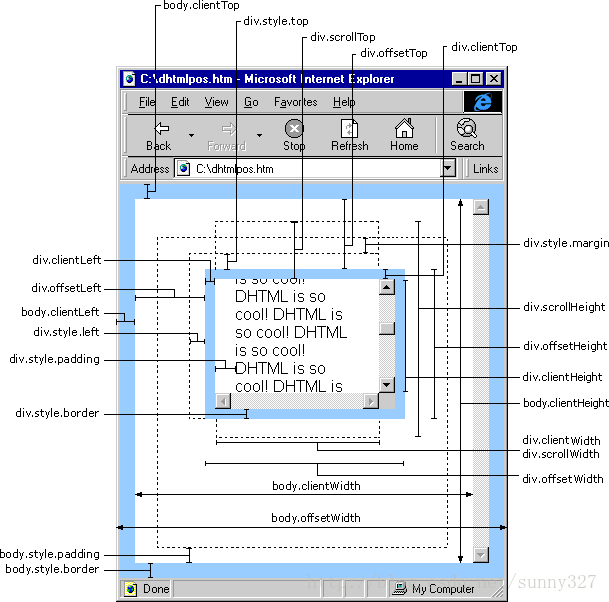
Element 位置信息
- clientHeight - 返回元素节点的可见高度,包括 padding、但不包括水平滚动条、 border 和 margin 的高度;对应为 clientWidth
- clientLeft - 返回元素节点左 border 的宽度,单位为像素,包括垂直滚动条的宽度,不包括左侧的 margin 和 padding;
- clientTop - 返回网页元素顶部 border 的宽度,不包括顶部的 margin 和 padding
- scrollHeight - 返回指定元素的总高度,包括由于溢出而无法展示在网页的不可见部分,包括 padding,但不包括 border 和 margin;对应为 scrollWidth
- scrollLeft - 设置或返回水平滚动条向右侧滚动的像素数量。它的值等于元素的最左边与其可见的最左侧之间的距离
- scrollTop - 设置或返回垂直滚动条向下滚动的像素数量。它的值等于元素的顶部与其可见的最高位置之间的距离
// 判断页面是否滚动到底部
element.scrollHeight - element.scrollTop === element.clientHeight;
Element 方法
- hasAttribute() - 返回一个布尔值,表示当前元素节点是否包含指定的 HTML 属性
- getAttribute() - 返回当前元素节点的指定属性
- removeAttribute() - 从当前元素节点移除属性
- setAttribute() - 为当前元素节点新增属性,或编辑已存在的属性
- querySelector() - 同 Document 方法,包括 querySelectorAll()、getElementBy…()
- closest() - 返回当前元素节点的最接近的父元素(或者当前节点本身)
- matches() - 返回一个布尔值,表示当前元素是否匹配给定的 CSS 选择器
- remove() - 用于将当前元素节点从 DOM 树删除
- scrollIntoView() - 滚动当前元素,进入浏览器的可见区域,可以接受一个布尔值作为参数。默认为 true,表示元素的顶部与当前区域的可见部分的顶部对齐(前提是当前区域可滚动);false 则为两者尾部对齐。
<article>
  <div id="div-01">Here is div-01
    <div id="div-02">Here is div-02
      <div id="div-03">Here is div-03</div>
    </div>
  </div>
</article>
var el = document.getElementById('div-03');
el.closest("#div-02") // div-02
el.closest("div div") // div-03
el.closest("article > div") //div-01
el.closest(":not(div)") // article
Text
Text 节点代表 Element 节点和 Attribute 节点的文本内容,可以使用 Document 节点的 createTextNode 方法创造一个 Text 节点。通过 firstChild、nextSibling 等获取 Text 节点。
Text 属性
- data - 等同于 nodeValue 属性,用来设置或读取 Text 节点的内容
- wholeText - 将当前 Text 节点与毗邻的 Text 节点,作为一个整体返回。大多数情况下,wholeText 属性的返回值,与 data 属性和 textContent 属性相同
- length - 回当前 Text 节点的文本长度
// 读取文本内容
document.querySelector('p').firstChild.data
// 等价于
document.querySelector('p').firstChild.nodeValue

// 设置文本内容
document.querySelector('p').firstChild.data = 'Hello World';
Text 方法
- appendData() - 在 Text 节点尾部追加字符串
- deleteData() - 删除 Text 节点内部的子字符串,第一个参数为子字符串位置,第二个参数为子字符串长度
- insertData() - 在 Text 节点插入字符串,第一个参数为插入位置,第二个参数为插入的子字符串
- replaceData() - 用于替换文本,第一个参数为替换开始位置,第二个参数为需要被替换掉的长度,第三个参数为新加入的字符串
- subStringData() - 用于获取子字符串,第一个参数为子字符串在 Text 节点中的开始位置,第二个参数为子字符串长度
- remove - 移除当前 Text 节点
// HTML代码为
// <p>Hello World</p>
var pElementText = document.querySelector('p').firstChild;

pElementText.appendData('!');
// 页面显示 Hello World!
pElementText.deleteData(7, 5);
// 页面显示 Hello W
pElementText.insertData(7, 'Hello ');
// 页面显示 Hello WHello
pElementText.replaceData(7, 5, 'World');
// 页面显示 Hello WWorld
pElementText.substringData(7, 10);
// 页面显示不变,返回 "World "
不同用法的区分
返回当前节点的内容,几种方法的比较:
- nodeValue - 一般只用在 Text 类型节点,其他大部分节点一律返回 null
- textContent - 返回当前节点和它的所有后代节点的文本内容,会获取 display:none 的节点的文本,且不会理会 html 格式,直接输出不换行的文本
- innerText - 返回当前节点和它的所有后代节点的文本内容,会忽略 display:none 的节点的文本
- innerHTML - 返回该元素包含的 HTML 代码,该属性可读写,常用来设置某个节点的内容
<article>
  <div id="div-01">Here is div-01
    <div id="div-02">Here is div-02
      <div id="div-03" style="display: none;">Here is div-03</div>
    </div>
  </div>
</article>
var article = document.getElementsByTagName('article')[0];

article.innerText;
// "Here is div-01
// Here is div-02"

article.textContent;
// "
//   Here is div-01
//     Here is div-02
//       Here is div-03
// "

article.innerHTML;
// "
//   <div id="div-01">Here is div-01
//     <div id="div-02">Here is div-02
//       <div id="div-03" style="display: none;">Here is div-03</div>
//     </div>
//   </div>
// "
通过改变节点内容,加上 style 标签还可以增添样式:
var style = document.createElement('style');

style.setAttribute('media', 'screen');
// 或者
// style.setAttribute("media", "@media only screen and (max-width : 1024px)");

style.innerHTML = 'body{color:red}';
// 或者
// sheet.insertRule("header { float: left; opacity: 0.8; }", 1);

document.head.appendChild(style);
// <style media="screen">body{color:red}</style>
参考链接
- Gitbooks - JavaScript 标准参考教程
- 容易混淆的 client-,scroll-,offset-* By zhangguixu