
正则表达式 & glob
什么是正则表达式
正则表达式(Regular Expressions) 是用于匹配字符串中字符组合的模式,构建正则表达式有两种形式:
/*
   /pattern/flags
*/
const reg = /[0-9a-zA-Z]/g;
/*
    new RegExp(pattern [, flags])
*/
const reg = new RegExp('^[0-9a-zA-Z-]+$', 'g');
const reg = new RegExp(/^[0-9a-zA-Z-]+$/g);

// 还可以使用变量
const reg = new RegExp(`.+(?=${c})`, 'g')
特殊字符(pattern)
(x) / (?:x)
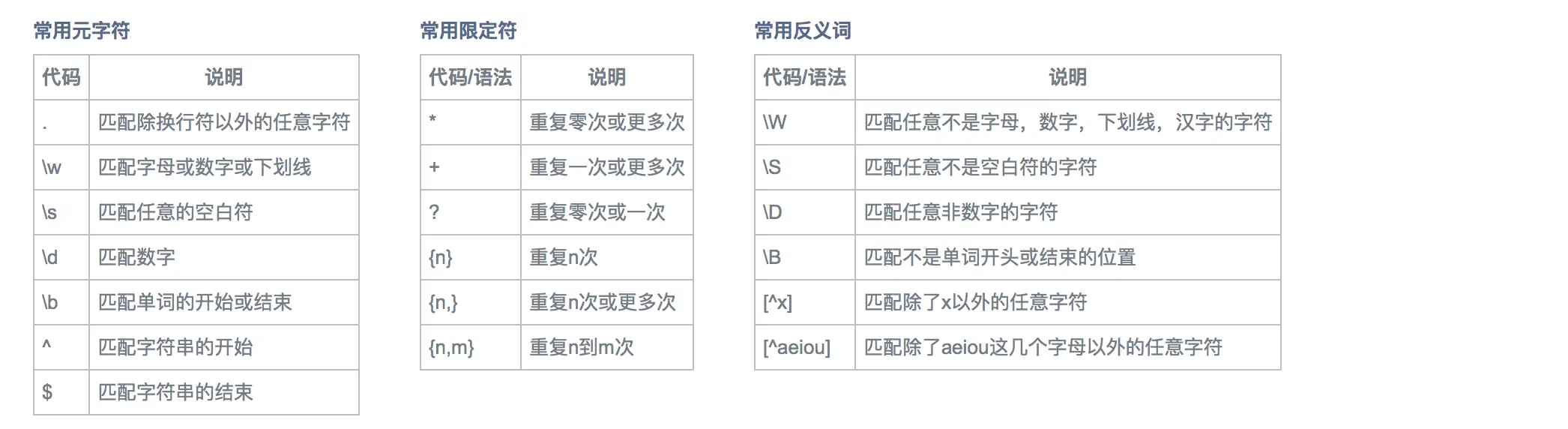
正则中,(x) 表示捕获数组,(?:x) 表示不捕获数组,在正则表达式的替换环节,则要使用像 $1、$2、$n 这样的语法,例如:
'bar foo'.replace( /(\w+) (\w+)/, '$2 $1'); // 'foo bar'
(?:x) 匹配 ‘x’ 但是不记住匹配项:
/foo{1,2}/; // {1,2} 将只对 'foo' 的最后一个字符 'o' 生效
/(?:foo){1,2}/; // 使用非捕获括号,则{1,2}会匹配整个 'foo' 单词
'abcabc'.match(/(?:a)(b)(c)/);
// 结果 ['abc', 'b', 'c']
// m[0] 是/(?:a)(b)(c)/匹配到的整个字符串,这里包括了 a
// m[1] 是捕获组1,即(b)匹配的子字符串
// m[2] 是捕获组2,即(c)匹配的子字符串

var m = 'abcabc'.match(/(a)(b)(c)/);
// 结果 ['abc', 'a', 'b', 'c']
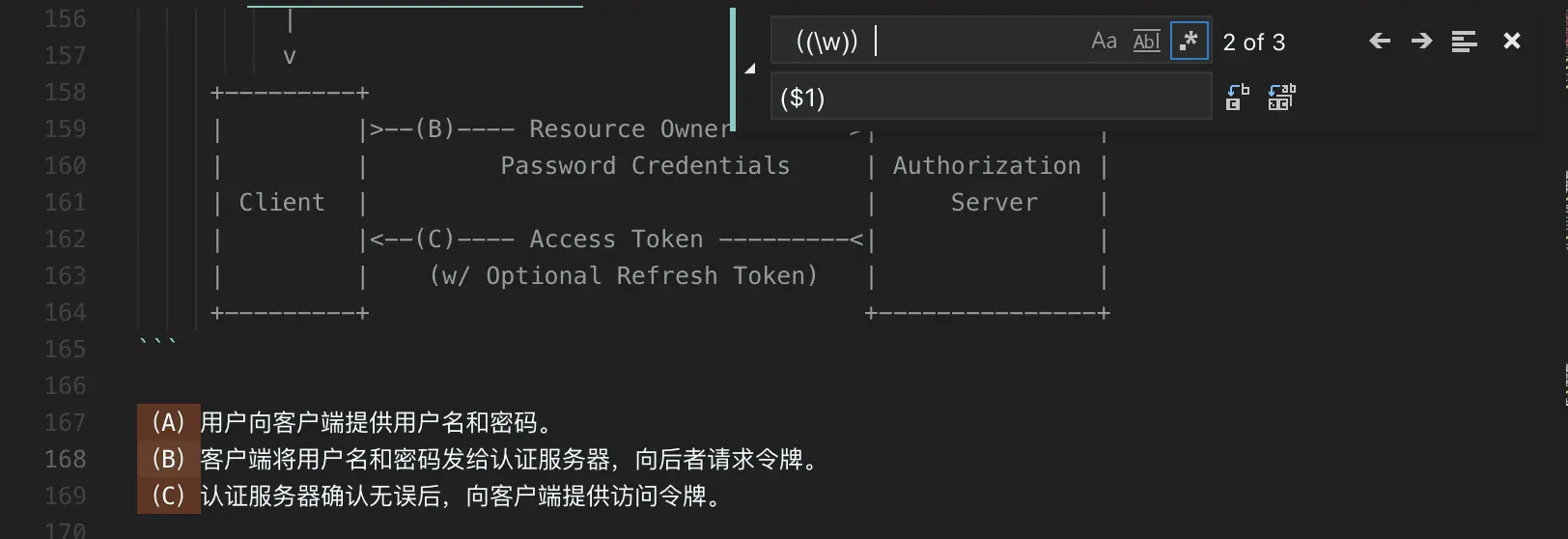
在 vscode 用正则替换字符时,也可以选择用此方法:
\1 / \n
\1 需要和分组符号 (x) 一起使用,代表与第一个小括号中要匹配的内容相同,同理 \2 匹配第二个括号的内容,举个栗子:
var reg = /(foo) (bar) \1 \2/;
var str = 'foo bar foo bar';
reg.test(str); // true
// 匹配重复 4 次或以上的字母和数字
var reg = /(\w)(?=\1{3,})/;
reg.test('tttttt'); // true
reg.test('ttts'); // false
先行断言 / 后行断言
正则表达式的先行断言和后行断言一共有 4 种形式:
- (?=pattern) - 零宽正向先行断言(zero-width positive lookahead assertion),代表字符串中的一个位置,紧接该位置之后的字符序列能够匹配 pattern
- (?!pattern) - 零宽负向先行断言(zero-width negative lookahead assertion),代表字符串中的一个位置,紧接该位置之后的字符序列不能匹配 pattern
- (?<=pattern) - 零宽正向后行断言(zero-width positive lookbehind assertion),代表字符串中的一个位置,紧接该位置之前的字符序列能够匹配 pattern
- (?<!pattern) - 零宽负向后行断言(zero-width negative lookbehind assertion),代表字符串中的一个位置,紧接该位置之前的字符序列不能匹配 pattern
零宽的含义是它们只匹配某些位置,在匹配过程中不占用字符。但是 JS 不支持后行断言,这里只考虑先行断言,举个栗子 🌰:
var str='snowTATE520snowZZ';
var reg=/snow(?=[A-Z])/g; // 匹配位置后面跟随任意一个大写字母的字符串 'snow'
console.log(str.match(reg)); // ['snow', 'snow']
再看个栗子,将数字转成金额显示,每三个位置用逗号隔开,如 15000 -> 15,000:
Number.prototype.formatNum = function() {
  let myNum = this + '';
  const reg = /\B(?=(?:\d{3})+$)/g;
  return myNum.replace(reg, ',')
};
var money = 15000;
console.log(money.formatNum());
如果对上述正则持有疑问,可以首先看下 \b 和 \B 的用法,可以查下上面的表格,看看两者有什么区别,简单来讲:
- \b - 匹配单词边界,即单词和符号的边界
- \B - 匹配非单词边界
[\b] 是匹配一个退格(U+0008)。切勿与 \b 混淆。
var str = 'this is,test';
str.split(/\B/); // ['t', 'h', 'i', 's i', 's,t', 'e', 's', 't']
str.split(/\b/); // ['this', ' ', 'is', ',', 'test']

'15000'.replace(/\B/g, ','); // '1, 5, 0, 0, 0'
因此正则中的 \B 可以看成匹配 “15000” 中的非单词边界,即每两个数字间的位置,但同时要满足先行断言 (\d{3}+$),即三个数字为一组,必须以一个或多个组结尾。进行 replace 位置替换后,过程如下图所示:
1 5 0 0 0       1 5 0 0 0      1 5,0 0 0
 | | | |    =>   | | | |   =>
 x ✔ x x           ,
标志(flags)
| 标志 | 描述 |
|---|---|
| g | 全局搜索 |
| i | 不区分大小写搜索 |
| m | 多行搜索 |
| u | unicode 模式,用来正确处理大于 \uFFFF 的 Unicode 字符 |
| y | 执行’粘性’搜索,匹配从目标字符串的当前位置开始,可以使用 y 标志 |
var reg = /\w+\s/g; // 匹配一个或多个字符后有一个空格的字符串,全局搜索
var str = 'a b c';

reg.flags; // 'g' 可通过 flags 获取标志
str.match(reg); // ['a', 'b', 'c'] 全局匹配
u 标志为 ES6 新增:
/^\uD83D/.test('\uD83D\uDC2A') // true
/^\uD83D/u.test('\uD83D\uDC2A') // false 修正错误

// 有些 Unicode 字符的编码不同,但是字型很相近,比如,\u004B 与 \u212A 都是大写的 K
'\u004B'.normalize() === '\u212A'.normalize(); // true
/[a-z]/i.test('\u212A') // false
/[a-z]/iu.test('\u212A') // true
y 标志位 ES6 新增,表示”粘性(sticky)”搜索,y 标志的作用与 g 标志类似,也是全局匹配,但后一次匹配都从上一次匹配成功的第一个位置开始:
var s = 'aaa_aa_a';
var r1 = /a+/g;
var r2 = /a+/y;
r2.sticky; // true

r1.exec(s) // ['aaa']
r2.exec(s) // ['aaa']

r1.exec(s) // ['aa']
r2.exec(s) // null 从 '_aa_a' 首位开始匹配
方法
| 方法 | 描述 | |
|---|---|---|
| exec | RegExp 方法 | 执行查找匹配,返回一个数组或 null |
| test | RegExp 方法 | 测试是否匹配,返回布尔值 |
| match | String 方法 | 执行查找匹配,返回一个数组或 null |
| search | String 方法 | 测试匹配,返回匹配到的位置索引或 -1 |
| replace | String 方法 | 执行查找匹配,并且使用替换字符串替换掉匹配到的子字符串 |
| split | String 方法 | 一个使用正则表达式或者一个固定字符串分隔一个字符串,并将分隔后的子字符串存储到数组中 |
var reg = /^t|$e/;
var name = 'tate';

reg.test(name); // true
reg.exec(name); // ['t', index: 0, input: 'tate']

name.match(reg); // ['t', index: 0, input: 'tate']
name.search(reg); // 0
name.split(reg); // ['', 'ate']
搭配 replace
replace 方法并不改变调用它的字符串本身,而只是返回一个新的替换后的字符串。替换字符串可以插入下面的特殊变量名:
// 使用方法
str.replace(regexp|substr, newSubStr|function)
var str = 'Twas the night before Xmas...';
var newstr = str.replace(/xmas/i, 'Christmas');
console.log(newstr); // Twas the night before Christmas...
| 变量名 | 描述 |
|---|---|
| $$ | 插入一个 ‘$’ |
| $& | 插入匹配的子串 |
| $` | 插入当前匹配的子串左边的内容 |
| $’ | 插入当前匹配的子串右边的内容 |
| $ | 假如第一个参数是 RegExp 对象,并且 n 是个小于 100 的非负整数,那么插入第 n 个括号匹配的字符串 |
var re = /(\w+)\s(\w+)/;
var str = 'John Smith';
var newstr = str.replace(re, '$2, $1');
console.log(newstr); // Smith, John
replace 还可以指定一个函数作为参数,该参数可以为:
| match | 匹配的子串。(对应于上述的 $&) |
| p1,p2, … | 假如 replace 方法的第一个参数是一个 RegExp 对象,则代表第 n 个括号匹配的字符串。(对应于上述的 $1,$2 等) |
| offset | 匹配到的子字符串在原字符串中的偏移量。(比如,如果原字符串是“abcd”,匹配到的子字符串是“bc”,那么这个参数将是 1) |
| string | 被匹配的原字符串 |
function replacer(match, p1, p2, p3, offset, string) {
  // p1 is nondigits, p2 digits, and p3 non-alphanumerics
  return [p1, p2, p3].join(' - ');
}
var newString = 'abc12345#$*%'.replace(/([^\d]*)(\d*)([^\w]*)/, replacer);
console.log(newString);  // abc - 12345 - #$*%
示例
1、验证 QQ 号合法性,合法 QQ 号规则:
- 5-15 位
- 全是数字
- 不以 0 开头
var reg = /^[1-9][0-9]{4,15}$/;
2、验证国内电话号码,如 0555-6581752、021-86128488:
var reg = /(^0[0-9]{3}-[1-9][0-9]{6}$)|(^0[0-9]{2}-[1-9][0-9]{7}$)/;
其他常用示例:
// 检验中文输入,对于两个双字节表示的汉字无效,如 '𠮷'
/[\u4e00-\u9fa5]/
// URL
/^https?:\/\/(([a-zA-Z0-9_-])+(\.)?)*(:\d+)?(\/((\.)?(\?)?=?&?[a-zA-Z0-9_-](\?)?)*)*$/i
// Email
/\w+([-+.]\w+)*@\w+([-.]\w+)*\.\w+([-.]\w+)*/
// trim() 去掉前后空格
/^\s+|\s+$/g
什么是 glob
Globs are the patterns you use when you run commands such as ls src/*.js, or you might see them used in config files such as a .gitignore where you might see .cache/*, for example.
glob 语法
* - matches zero or more characters.
src/*.js 表示 src 目录下所有以 js 结尾的文件,但是不能匹配 src 子目录中的文件
? - matches exactly one character.
test/?at.js 匹配形如 test/cat.js、test/bat.js 等所有3个字符且后两位是 at 的 js 文件,但是不能匹配 test/flat.js
src/index.?? 匹配 src 目录下以 index 打头,后缀名是两个字符的文件,例如可以匹配 src/index.js 和 src/index.md,但不能匹配 src/index.jsx
** - the “globstar”, is used it matches zero or more directories and subdirectories. This allows for recursive directory searching easily.
/var/log/** 匹配 /var/log 目录下所有文件和文件夹,以及文件夹里面所有子文件和子文件夹
/var/log/**/*.log 匹配 /var/log 及其子目录下的所有以 .log 结尾的文件
/home/*/.ssh/**/*.key 匹配所有用户的 .ssh 目录及其子目录内的以 .key 结尾的文件
{ab,cd,ef} - matches exactly one of the “parts” provided. These “parts” can also span multiple “sections” of the glob, so you can include directory separators in them.
{ab,cd/ef}/*.js 可以匹配 ab/file.js,也可以匹配 cd/ef/file.js
a.{png,jp{,e}g} 匹配 a.png、a.jpg、a.jpeg
{a..c}{1..2} 匹配 a1 a2 b1 b2 c1 c2
[abc] - matches a range of characters. If the first character of the range is ! or ^ then it matches any character not in the range. - 表示范围
test/[bc]at.js 只能匹配 test/bat.js 和 test/cat.js
test/[c-f]at.js 能匹配 test/cat.js、test/dat.js、test/eat.js 和 test/fat.js
test/[!bc]at.js 不能匹配 test/bat.js 和 test/cat.js,但是可以匹配 test/fat.js
!(ab|cd|ef) - matches anything that does not directly match any of the patterns in the parentheses. Patterns in the group are separated by the pipe character |.
?(ab|cd|ef) - matches zero or one occurrence of the patterns given.
+(ab|cd|ef) - allows for one or more occurrences of the patterns to be matched.
*(ab|cd|ef) - matches zero or more occurrences of the patterns listed.
@(ab|cd|ef) - ensures that exactly one of the patterns provided matches.
小括号必须跟在
?、*、+、@、!后面使用,且小括号里面的内容是一组以|分隔符的模式集合
参考链接
- MDN - 正则表达式
- JS 正则表达式入门,看这篇就够了 By wuming
- 正则表达式零宽断言详解(?=,?<=,?!,?<!) By 无所事事者爱嘲笑
- String.prototype.replace()